
WhatsApp Automation for Business: How to Book Appointments, Follow Up Leads, Reactivate Customers and Drive Revenue
21 min read
WhatsApp automation is no longer just about sending automatic replies.
For businesses that depend on enquiries, appointments, consultations, bookings or repeat customers, WhatsApp can become part of the system that moves a customer from their first message to their next purchase.
A person can discover your business on Instagram. They can click a WhatsApp button, ask a question, and become a qualified lead. They can choose an appointment, receive a reminder, and reschedule instead of disappearing. They can be followed up with after an enquiry. And months later, they can receive a relevant message that brings them back.
The important part is not the WhatsApp message itself. It is what happens around the message.
When WhatsApp is connected to your calendar, CRM, customer records and business workflows, conversations can become part of a much larger revenue system.
- 73.3%
- prefer messaging when communicating with a business
- 72.4%
- more likely to purchase from a brand that offers messaging
- 22
- markets surveyed, Singapore among them
Kantar for Meta, State of Business Messaging: 11,056 online adults aged 18–64 across 22 markets including Singapore, surveyed April–September 2025. Consumer preference, not a measure of revenue.
That does not mean WhatsApp automatically creates revenue. It means businesses have another opportunity to remove friction between interest and action. And that distinction matters.
WhatsApp Automation Is Not Just an Auto-Reply
When most business owners hear “WhatsApp automation”, they imagine something simple: a customer sends a message, and an automatic reply is sent back. That is only the beginning.
Automating a message
- Customer sends a message
- An automatic reply is sent
- The conversation sits in an inbox
- Someone remembers to act, or does not
Automating a customer journey
- The enquiry becomes a record
- Intent and requirements are established
- An appointment is offered, booked and confirmed
- Reminders, follow-up and re-engagement happen on their own
A useful WhatsApp system runs the whole sequence: the customer discovers you, starts a conversation, gets an immediate response, is qualified, chooses what they want, books, receives a confirmation and a reminder, can reschedule or cancel, gets followed up when they do not complete the next step, hears from you after the appointment, and can be reactivated later.
The difference is significant. The first example automates a message. The second automates a customer journey. That is where WhatsApp becomes much more interesting for a business.
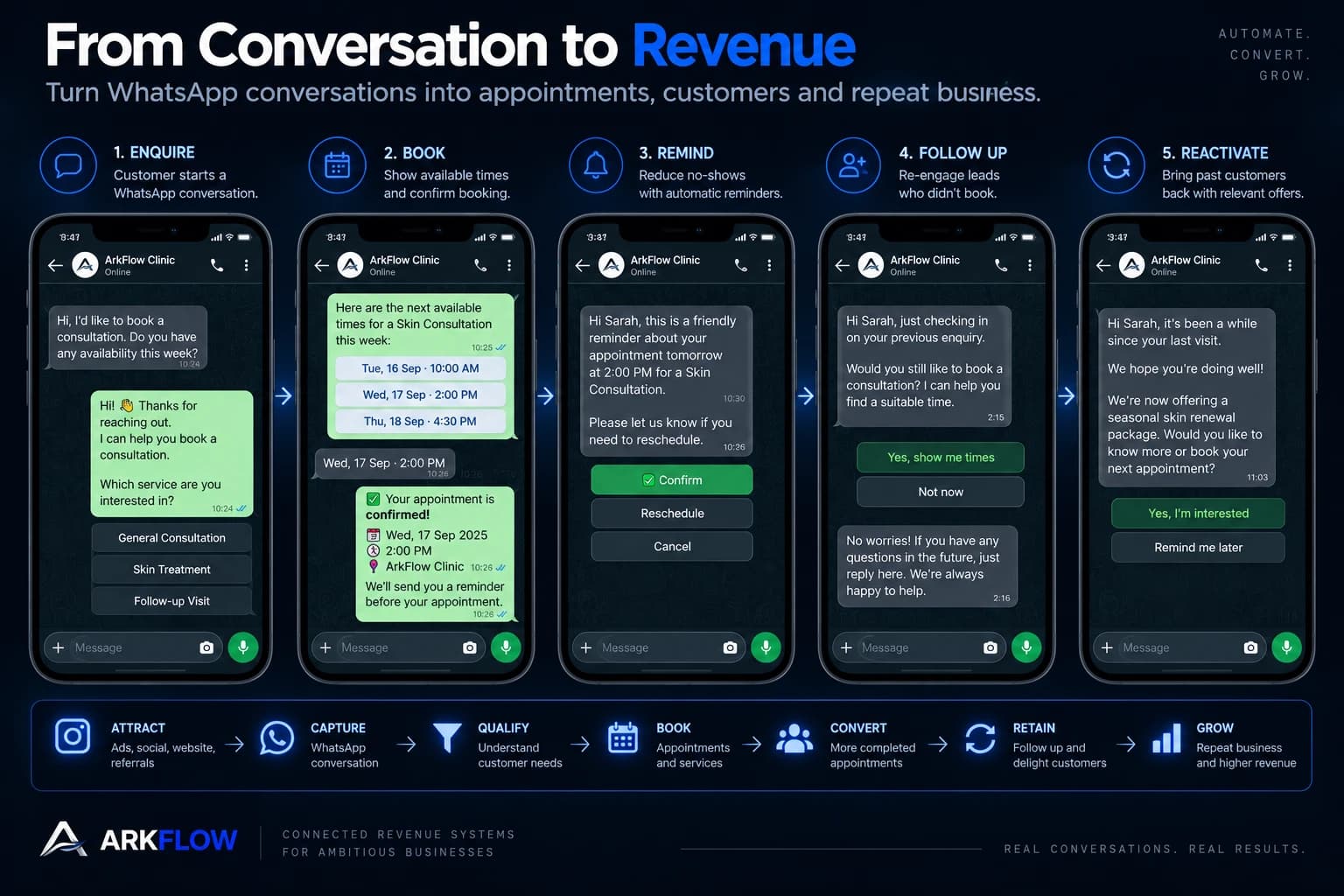
Why WhatsApp Has Become Important for Business
WhatsApp is already deeply embedded in everyday communication. Meta says more than two billion people use WhatsApp every day, and that millions of them use messaging to get information, book services and receive updates from businesses.
There is a simple reason messaging works well for many customer journeys. It reduces friction. Compare the two routes a customer can take to the same outcome.
The traditional route
- Sees your business, visits the website
- Finds the contact page and calls
- Waits, then explains what they need
- Is told to fill in a form
- Waits again for a reply
- Eventually receives a booking link
The conversational route
- Sees your business, taps WhatsApp
- “Hi, I’d like to book an appointment.”
- “Sure — which service are you interested in?”
- Chooses a service
- Sees available times and picks one
- Appointment confirmed
Every additional step creates another opportunity for the customer to stop. The second journey does not necessarily require less human involvement in every situation. But it can require less unnecessary friction — and that is one of the most useful applications of automation.
Turn WhatsApp Into an Appointment Booking Channel
One of the clearest applications is appointment booking. Instead of asking customers to leave WhatsApp and navigate another system, a business can design a conversation that moves them toward a booking.
- 01
Customer: “Hi, I’d like to book a consultation.”
The enquiry arrives on the channel the customer already uses, at whatever hour they happen to be free.
- 02
System: “Absolutely. What would you like help with?”
The first reply is immediate, and it asks the question that decides everything after it.
- 03
System: “Would you prefer weekday or weekend availability?”
One qualifying question, not a form. Each answer narrows what needs to be offered next.
- 04
System: “We have Tuesday 3:00 PM, Wednesday 11:00 AM and Thursday 5:30 PM.”
Availability comes from the calendar itself, so the times offered are times that actually exist.
- 05
System: “You’re booked for Wednesday at 11:00 AM.”
The conversation updates the underlying appointment record, and a reminder is scheduled.
Meta’s own Business Agent product, made generally available in June 2026, explicitly includes answering customer questions, qualifying leads, booking appointments and handing a conversation to a person when it needs one. That is a meaningful shift: WhatsApp is no longer simply where the conversation happens. It can be where the transactional step happens.
Let Customers Reschedule or Cancel Without Calling
Booking is only half the problem. What happens when a customer cannot attend? Without a system, they might call, message, wait for a reply, forget to follow up — or simply not show up.
If the customer chooses to reschedule, the system can guide them to another available time. If they cancel, the system can record it and, depending on the business process, open the slot for someone else.
This matters because a cancellation is not necessarily lost revenue. A late cancellation with nobody to fill the slot can become lost revenue. A cancellation that happens early enough to trigger another booking opportunity is a different thing entirely. The goal of automation here is not “stop cancellations”. It is: make the next action easy.
Remind Customers Before the Appointment
A booking is not revenue until the customer actually attends. That makes reminders important — and the published evidence is more interesting than “reminders work”.
| Study | What was compared | Reported no-show rates |
|---|---|---|
| American Journal of Medicine (2010), 12,092 patients randomised at one US medical group | Live staff reminder, automated reminder, or none — all three days ahead | 13.6% staff · 17.3% automated · 23.1% no reminder |
| medRxiv preprint (posted 19 August 2026), 475,214 appointments, Buenos Aires public health system | WhatsApp reminders at ~24h, at ~72h, both, or none | Baseline 34.6%; single 24h reminder strongest (risk ratio 0.76) |
Two honest caveats belong with that table. The 2010 trial found automated reminders less effective than a call from a member of staff — automation reduced no-shows compared with nothing, but a person did better. And the Buenos Aires study is a preprint, which means it has not yet been peer-reviewed, so it should be read as promising rather than settled. It also found that reminders increased patient-initiated cancellations, which is not a failure: a cancellation you know about in advance is a slot you can refill.
Follow Up With Leads Who Did Not Book
This is where WhatsApp automation becomes much more powerful. Consider a typical enquiry. A potential customer asks how much the consultation costs. Your team answers. The customer says “okay, let me think about it.” And then disappears.
In many businesses, what happens next is nothing. The conversation sits inside WhatsApp. Nobody remembers to follow up. The lead is forgotten, and the customer eventually buys somewhere else. That is not a lead generation problem. It is a follow-up problem.
- 01
Day 0 — the enquiry
The customer asks, the business answers, and no booking is made. The record notes what they asked about.
- 02
Day 1 — a specific check-in
“Hi Sarah, just checking in on your enquiry from yesterday. Would you like me to help you find a suitable appointment time?”
- 03
Day 3 — one more, still contextual
“Just following up in case you still had questions about the consultation. If you’d like, I can help you with the next available options.”
- 04
Day 7 — close the loop, politely
“We haven’t heard back, so we’ll close this conversation for now. If you’d still like to speak with us, just reply here and we’ll pick up where we left off.”
This is very different from repeatedly sending “Hi, just following up.” The best automation is contextual. It knows what the customer asked about, when they got in touch, whether they booked, whether they cancelled, what stage they are at, and whether a human has already spoken to them.
The objective is not to send more messages. It is to stop valuable conversations from disappearing simply because nobody remembered the next step.
Reactivate Leads That Went Cold
Not every lost lead is lost forever. Some people were interested but were not ready, were comparing options, were busy, needed to discuss it with someone, or simply forgot. Months later, the same person may still have the same underlying need.
Imagine a business with a thousand previous enquiries. Some booked. Some did not. Some cancelled. Some bought once and never returned. Without a structured customer record, those people are a forgotten database. With one, they are identifiable segments — and each segment deserves a different message.
| Segment | What happened | What a relevant message acknowledges |
|---|---|---|
| A | Enquired, never booked | They asked about something specific, and availability has changed |
| B | Booked, then cancelled | They already chose to come in once |
| C | Completed once, never returned | The first visit happened, and a next step may be due |
| D | Previous customer, may be due again | Timing, based on what they had done before |
A cold-lead message can then say something true: “You previously enquired about our consultation but didn’t end up booking. We’re opening new appointment availability this month — if you’re still considering it, I can help you find a time.” A returning-customer message can say something different: “It’s been a while since your last appointment. If you’d like to continue where you left off, we can help you find a suitable time.”
The difference is context. A customer should feel like the business remembers them, not like they were added to a broadcast list.
Automate Follow-Up After the Appointment
Automation should not stop when the customer books. The period after the appointment is often where the next sale is either set up or quietly lost.
Instead of every interaction being a separate event, the business starts treating the customer relationship as a journey. That is particularly useful where customers return repeatedly.
WhatsApp Can Become a Marketing Channel
There is an important distinction between broadcasting messages and automating customer journeys. Broadcasting says: “here is today’s promotion.” Automation asks: “based on what this customer has done, what is the most relevant next conversation?”
Imagine a business launches a new service. Instead of sending one message to the entire database, it can identify who each group actually is.
- Existing customers — something new that relates to the service they have already used
- Leads who enquired but never booked — they asked about this, and availability has opened
- Customers who have not returned — it has been a while, and there is new availability
- Recent customers — thanks for visiting, and here is the sensible next step
The message changes because the context changes. Meta has also been consolidating this side of the channel: since July 2025, businesses have been able to plan and manage campaigns across WhatsApp, Facebook and Instagram from one place in Ads Manager.
WhatsApp Marketing Should Not Mean Spamming
More messages do not automatically mean more revenue. Irrelevant messages damage the relationship, and the platform itself now pushes back. Businesses using the WhatsApp Business Platform can only start conversations using pre-approved templates, Meta has introduced limits on how many marketing messages a person receives, and people can stop chatting with a business or give feedback at any time.
If your business operates in Singapore
Singapore adds a specific layer. The PDPC’s guidance on marketing consent states that an organisation has to check the Do Not Call Registry before sending a specified message to a Singapore telephone number, unless the user or subscriber has given clear and unambiguous consent in evidential form, or the organisation falls within an exemption. Where an individual opts out, the marketing has to stop.
In practice, a responsible WhatsApp system needs the unglamorous parts built in:
- Consent tracking, recorded against the customer rather than remembered informally
- Clear opt-in, and an opt-out that actually works
- The right message category for the right kind of message
- Frequency controls, so one customer is not messaged by three workflows at once
- Relevance — a reason this person is receiving this message now
- Human escalation when the conversation stops being routine
- Accurate customer records, because every rule above depends on them
Connect WhatsApp to Your CRM
This is where many WhatsApp strategies fall short. A business may have thousands of conversations, but conversations alone do not create a system. The information has to become structured.
| Field | Value | Why it matters |
|---|---|---|
| Source | Tells you which channels produce real enquiries | |
| Enquiry | Consultation | What they actually asked for, in their words |
| Status | Qualified | Whether this is a fit, decided once |
| Appointment | Wednesday, 11:00 AM | The commitment, visible to everyone |
| Outcome | Booked | What happened, not what was hoped for |
| Next action | Reminder | The step the system owes, not a person’s memory |
Now the business can see what is happening, and the WhatsApp conversation becomes part of the customer record rather than a disconnected chat. This is one of the core ideas behind revenue operations: the message is only one part, and the record behind the message is what allows the business to keep moving.
Connect WhatsApp to Your Calendar
Imagine a customer messages at 11:47 PM. Your business is closed. Without automation, they wait until tomorrow — and by then they may have contacted someone else.
With a connected workflow, the customer asks to book, the system offers the next available times, the customer chooses, the calendar updates and a confirmation is sent. They have moved from interest to appointment without waiting for someone to wake up.
This does not mean every booking should be fully automated. Some businesses have complex appointments, multiple practitioners or circumstances that genuinely require a person. That is exactly why good automation needs a human handover.
Know When a Human Should Take Over
Automation should not try to replace every human conversation. A good system knows when it has reached the edge of what it should handle.
Automation handles
- Opening hours, location, common questions
- Lead capture and qualification
- Availability, booking requests and confirmations
- Reminders and simple rescheduling
- Structured follow-up and reactivation
A person handles
- Complaints and sensitive cases
- Complex or unusual questions
- High-value opportunities
- Anything needing professional judgement
- Any customer who asks for a person
The best system is therefore not “AI instead of people”. It is automation for repeatable work, and people for work that requires judgement. Meta’s Business Agent includes the same principle: a team member can step in when the conversation needs one.
How WhatsApp Automation Can Help Recover Revenue Already Generated
Many businesses assume growth means more leads. But there are several places where revenue can leak after a lead has already arrived — and each of them is a workflow gap rather than a demand problem.
| Where it leaks | What happens | What can close the gap |
|---|---|---|
| Lead | An enquiry arrives and the reply is slow or never comes | An immediate first response, whatever the hour |
| Follow-up | “I’ll think about it”, and nobody follows up | A contextual sequence that knows what they asked |
| Booking | The customer wants to book but the process is awkward | Real availability offered in the conversation |
| Appointment | Booked, no reminder, and the customer forgets | A reminder at a time that has been thought about |
| Cancellation | Someone cancels and the slot stays empty | An immediate offer to rebook, early enough to refill |
| Retention | One purchase, no structured follow-up | A next step after the appointment, not silence |
| Reactivation | Previous customers go quiet and are never contacted | Segments, and a reason to get back in touch |
That means a business does not necessarily need to generate more demand before improving revenue. It can first improve what happens to the demand it already has.
The Revenue Equation Behind WhatsApp Automation
Think about a simple funnel. A business receives a thousand enquiries. Not every enquiry becomes a customer: some are not a fit, some never get a timely response, some enquire and disappear, some book and cancel, some attend once and never return.
WhatsApp automation can influence several of those stages at once — more enquiries captured, faster responses, better qualification, more completed bookings, fewer avoidable missed appointments, more follow-up and more reactivation. Added together, that is more opportunities to convert demand the business has already paid to create.
This is why it is not especially useful to describe WhatsApp automation as “a chatbot”. A chatbot answers messages. A connected WhatsApp system helps manage the movement of an opportunity through the business.
Example: A Complete WhatsApp Customer Journey
Imagine a service business receiving enquiries through Instagram, Facebook, its website, WhatsApp, Google and referrals. Someone sees an Instagram post and taps through to WhatsApp. From there the journey has ten steps, and none of them depends on somebody remembering.
- 01
Capture
The enquiry arrives and a customer record is created.
- 02
Respond
The customer gets an immediate, relevant first reply.
- 03
Qualify
The system asks what it needs to know, and only that.
- 04
Book
Genuine availability is offered inside the conversation.
- 05
Confirm
The booking is recorded and confirmed.
- 06
Remind
A reminder is sent before the appointment.
- 07
Recover
If they cancel, rescheduling is offered immediately.
- 08
Follow up
If they never booked, the agreed sequence runs.
- 09
Retain
After the appointment, the relevant next message goes out.
- 10
Reactivate
If they go quiet, they are identified for re-engagement.
At no point did the business need someone to manually remember every step. That is the real value of automation: not fewer messages, but fewer opportunities falling through the cracks.
WhatsApp Automation vs WhatsApp Marketing
These terms are often used interchangeably, but they do different jobs.
WhatsApp marketing
- Campaigns and announcements
- Promotions and launches
- Re-engagement messages
- Creates and revives demand
WhatsApp automation
- Responding, qualifying, booking
- Confirming, reminding, rescheduling
- Follow-up, routing, record updates
- Moves an opportunity forward
A connected system combines them. Marketing creates demand. Conversation captures it. Automation moves the opportunity forward. The CRM stores the relationship. Follow-up recovers what was unfinished. Reactivation brings previous customers back. Reporting shows where the journey is leaking. That is a much larger idea than sending WhatsApp messages.
What Businesses Should Actually Measure
Do not measure WhatsApp automation by how many messages were sent. That is a weak metric. Measure the movement of opportunities instead.
| Area | Worth measuring |
|---|---|
| Acquisition | Conversations started, source of conversation, qualified enquiries |
| Conversion | Booking rate, completed booking rate, response-to-booking time |
| Appointment health | Confirmation rate, cancellation rate, reschedule rate, no-show rate |
| Follow-up | Leads followed up, conversations restarted, bookings recovered |
| Retention | Repeat bookings, time between visits, reactivation rate |
| Revenue | Booked revenue, completed revenue, repeat revenue |
Instead of asking “is WhatsApp working?”, you can ask a better question: where is WhatsApp helping customers move further through our revenue journey?
A Practical WhatsApp Automation Architecture
Underneath all of this, the shape of a mature system is fairly consistent. Traffic arrives from ads, social, search, the website and referrals. WhatsApp is where the conversation starts. Everything after that is the system doing its job: capture, respond, qualify, book, confirm, remind, recover, follow up, retain, reactivate — and report, so the business can see what is moving and where opportunities are leaking.
That is also why WhatsApp should not become another isolated tool. It works best connected to the CRM, the calendar, the website, the lead sources, the customer records, the follow-up workflows and the reporting. The customer sees one conversation. Behind it, the business has one system — which is the same argument ArkFlow makes about a website being the front door rather than a brochure.
The Biggest Mistake: Automating Everything
It is tempting to automate every possible message. That is usually the wrong objective. The question is not “how much can we automate?” but “which parts of this customer journey should happen automatically?”
If a customer asks what time you close, automation makes sense. If a customer asks you to help them choose between two services for their particular situation, a person is probably better. If someone wants to book, automation removes friction. If someone has a sensitive complaint, human involvement may be essential.
Good automation is therefore selective. It removes repetitive work while preserving the moments where human judgement matters.
Where Should Your Business Start?
Do not begin by asking which WhatsApp chatbot to buy. Start by asking where customers are currently getting stuck.
- Where do enquiries arrive, and how quickly are they answered?
- How many are qualified, and how many actually book?
- What happens when someone does not book?
- What happens when someone cancels, or does not show up?
- What happens after the appointment?
- How are previous customers brought back?
- And where does the next step depend on someone remembering to do it manually?
That last question is usually where automation creates the most useful leverage.
The Question Is Not Whether Your Business Uses WhatsApp
The better question is what happens after someone messages you. If the answer is “someone will reply when they’re free”, there may be an opportunity. If it is “we get enquiries but many never book”, there may be an opportunity. If it is “customers cancel and we struggle to refill the slot”, or “we have thousands of previous customers but rarely contact them”, there may be an opportunity.
And if the answer is “we already have WhatsApp, but it isn’t connected to the rest of our business” — that may be the biggest opportunity of all.
The best WhatsApp automation does not feel like a marketing machine. It feels like a business that responds quickly, remembers context and makes it easier for customers to take the next step. The goal isn’t to automate WhatsApp. It is to build a better customer journey around the conversations your business is already having.
Sources
Every figure above comes from one of the following, each checked against the original on 22 September 2026.
- 01Kantar for Meta, “The State of Business Messaging” — 11,056 online adults aged 18–64 across 22 markets including Singapore, surveyed April–September 2025. whatsappbusiness.com/resources/resource-library/state-of-business-messaging/
- 02Meta, “Ways To Manage Your Businesses Chats On WhatsApp”, 3 April 2025 — more than two billion daily users, pre-approved templates, marketing message limits and user controls. about.fb.com/news/2025/04/ways-to-manage-your-businesses-chats-on-whatsapp/
- 03Meta, “Be There for Every Customer With Meta Business Agent”, June 2026 — answering questions, qualifying leads, booking appointments and handing off to a person. about.fb.com/news/2026/06/meta-business-agent/
- 04Parikh et al., “The Effectiveness of Outpatient Appointment Reminder Systems in Reducing No-Show Rates”, The American Journal of Medicine, 2010 — 12,092 patients randomised; no-show rates 13.6% (staff), 17.3% (automated) and 23.1% (none). amjmed.com/article/S0002-9343(10)00108-7/fulltext
- 05Esteban et al., “Comparative Effectiveness of Single vs. Dual WhatsApp Reminders on No-shows: A Target Trial Emulation within the Public Health System of Buenos Aires, Argentina”, medRxiv preprint posted 19 August 2026 — 475,214 appointments; not peer-reviewed. medrxiv.org/content/10.64898/2026.08.17.26360609v1
- 06Singapore PDPC, “Advisory Guidelines on Requiring Consent for Marketing Purposes” — checking the Do Not Call Registry before sending a specified message, unless clear and unambiguous consent in evidential form has been given or an exemption applies. pdpc.gov.sg
- 07Meta, “Centralized Campaigns, AI Support and More for Businesses on WhatsApp”, July 2025 — campaign management across WhatsApp, Facebook and Instagram in Ads Manager. about.fb.com/news/2025/07/centralized-campaigns-ai-support-businesses-whatsapp/
Common questions
- What is WhatsApp automation for business?
- It is the connection between WhatsApp and the systems behind it — customer records, calendar, follow-up and reporting — so an enquiry can be answered, qualified, booked, reminded, followed up and reactivated without depending on someone remembering each step. An automatic reply is only the first part of that.
- Is WhatsApp automation just a chatbot?
- No. A chatbot answers messages. A connected WhatsApp system moves an opportunity through the business: it creates a record, offers real availability from your calendar, confirms the booking, sends the reminder, and knows when to hand the conversation to a person.
- Can WhatsApp reminders reduce missed appointments?
- Published research suggests reminder timing and design can influence attendance. A 2010 randomised trial reported no-show rates of 13.6% with staff reminders, 17.3% with automated reminders and 23.1% with none, and a 2026 preprint on WhatsApp reminders found the strongest effect from a single reminder about 24 hours ahead. Neither predicts a result for any particular business.
- What should stay with a person rather than being automated?
- Complaints, sensitive cases, complex or unusual questions, high-value opportunities, anything needing professional judgement, and any customer who asks for a person. Automation should handle the repeatable work around those moments, not replace them.
- What do Singapore businesses need to consider before sending WhatsApp marketing?
- Singapore's PDPC guidance requires an organisation to check the Do Not Call Registry before sending a specified message to a Singapore telephone number, unless clear and unambiguous consent in evidential form has been given or an exemption applies, and opt-outs must be honoured. This is a description of published guidance, not legal advice.
See what ArkFlow can automate
WhatsApp is one door into the business. What decides the outcome is whether the enquiry it captures becomes a record that gets answered, qualified, booked and followed up.
See how the journey connects →Not sure where WhatsApp automation would actually make sense in your business?
Start with the workflow, not another subscription. We'll look at where your enquiries arrive, how they are handled today, where bookings are lost, where follow-up breaks, how customers become inactive — and where WhatsApp could connect into the revenue journey you already have.